Specs

Color
Black
Model
MK5
Product group
BISS
Size
4.3inch

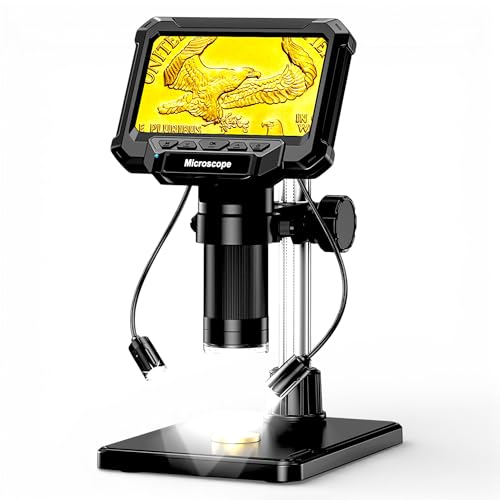
Aikokkl 4.3" LCD Digital Coin Microscope MK5 Black

Aikokkl
$39.99 Checked 2 hours ago
View on Amazon
  • CRUCIAL NOTE FOR COIN COLLECTORS
  • SD CARD NOT INCLUDED
  • NO MORE BLURRY IMAGES
  • PC LIVE VIEW & CATALOGING
  • SHADOW-FREE RELIEF ILLUMINATION

About this product

The Aikokkl 4.3" LCD Digital Coin Microscope is engineered for inspecting microscopic details such as Doubled Dies, Repunched Mint Marks, and scratches. While it excels at extreme close-ups of specific coin sections, the 4.3-inch screen and focal length limitations mean it cannot capture the entire view of large coins like Morgan Dollars. It is well-suited for full views of smaller items.

Documentation is supported with 1080P video and 10M photo capabilities, though an SD card is required and not included. For clear images, users should adjust bracket height with side knobs before rotating the large silver focus wheel. The device offers PC Live View via USB Type-C, compatible with Windows and Mac, facilitating digital archiving. Illumination includes 8 built-in LEDs and 2 detachable auxiliary side lamps, providing shadow-free, directional lighting to highlight relief elements and hairline scratches for accurate condition grading.
View on Amazon

Similar products

Layout

Questions

What is the primary use of the Aikokkl MK5 microscope?

The Aikokkl MK5 microscope is primarily designed for inspecting microscopic details on coins, such as Doubled Dies, Repunched Mint Marks, and scratches.

Can the Aikokkl 4.3" LCD microscope capture an entire large coin?

No, due to its 4.3" screen size and focal length, the Aikokkl microscope cannot capture the entire view of large coins like Morgan Dollars or Silver Eagles. It displays full views of smaller items or close-ups of specific coin sections.

Is an SD card included with the Aikokkl Digital Coin Microscope?

No, an SD card is not included. A Micro SD/TF card (up to 32GB max) is required to save photos and videos directly to the Aikokkl device.

How do users achieve clear images with the Aikokkl microscope?

To achieve clear images, first adjust the bracket height using the side knobs for desired magnification, then slowly rotate the large silver focus wheel on the main barrel until the image is clear.

Does the Aikokkl MK5 support PC connectivity?

Yes, the Aikokkl MK5 supports PC live view. It connects via USB Type-C to Windows (using Camera/HiView) or Mac (using Photo Booth) for large-screen analysis and digital archiving.